
Overview
Start Using LastPassSo here's the question everyone typing into Google wants answered: does LastPass still hold up in 2026? Short answer: yes. Long answer: keep reading. Anyone who has recently examined LastPass reviews has likely encountered a blend of longstanding scepticism and recent praise, and both perspectives hold merit. Passwords are a mess. Everybody has forty accounts; three of them share the same password, and one of them is probably "Summer2019" (don't worry, no judgement here). That's exactly the kind of chaos LastPass was built to fix. LastPass has remained popular for a reason, thanks to its encrypted vault, reliable autofill feature, and dark web alerts that effectively work in the background. This post walks through LastPass features, breaks down LastPass pricing without the fine-print headache, settles the LastPass free vs premium debate once and for all, and takes an honest look at whether it deserves a spot on the phone or laptop this year. Grab a coffee. This one's worth the read.
What Is LastPass, Really?
Okay, quick refresher for anyone who wandered in mid-thought. LastPass is a password manager, cloud-based, that stores, generates, and autofills logins across browsers and devices. Data gets encrypted locally first, before it ever touches the cloud, so only the account holder can actually open the vault. Millions use it. Thousands of businesses too. Windows, Mac, iOS, Android, and every major browser – it's all covered. Setup takes maybe five minutes, and after that the extension just kind of sits there quietly, doing the heavy lifting. Simple. That's the whole pitch, really.LastPass Reviews 2026: What People Are Actually Saying
Scroll through recent LastPass reviews and a few things come up again and again. The interface is clean. Autofill is fast, faster than expected, honestly. People like the shared folders for family accounts or small teams, and the security dashboard gets a lot of love too, since it flags weak or reused passwords without being asked. That little nudge helps more than people expect. Businesses lean toward praising the admin controls. Regular folks mention the free tier as a convenient, low-pressure way to test the waters first. And the import process? The import process is apparently painless; it only takes a couple of clicks, and old logins are immediately available in the new vault.LastPass Features Worth Knowing About
There's a solid toolkit packed in here, and it keeps growing every year. Quick rundown:- Password vault with unlimited storage, no weird caps
- Password generator for strong, unique logins on the spot
- Browser and mobile autofill for logins, forms, and even payment info
- Dark web monitoring that flags credentials showing up somewhere they shouldn't
- Secure password sharing, one-to-one or through shared folders
- Multi-factor authentication (MFA) for that extra layer of "nope, not today, hackers"
- A security dashboard that scores overall password health
LastPass Free vs Premium: Which One Actually Fits?
The decision comes down mostly to how many device types need syncing. Free works fine for people who only need one device type. Premium unlocks access across device types, along with extra features and unlimited file storage.Here's the side-by-side:
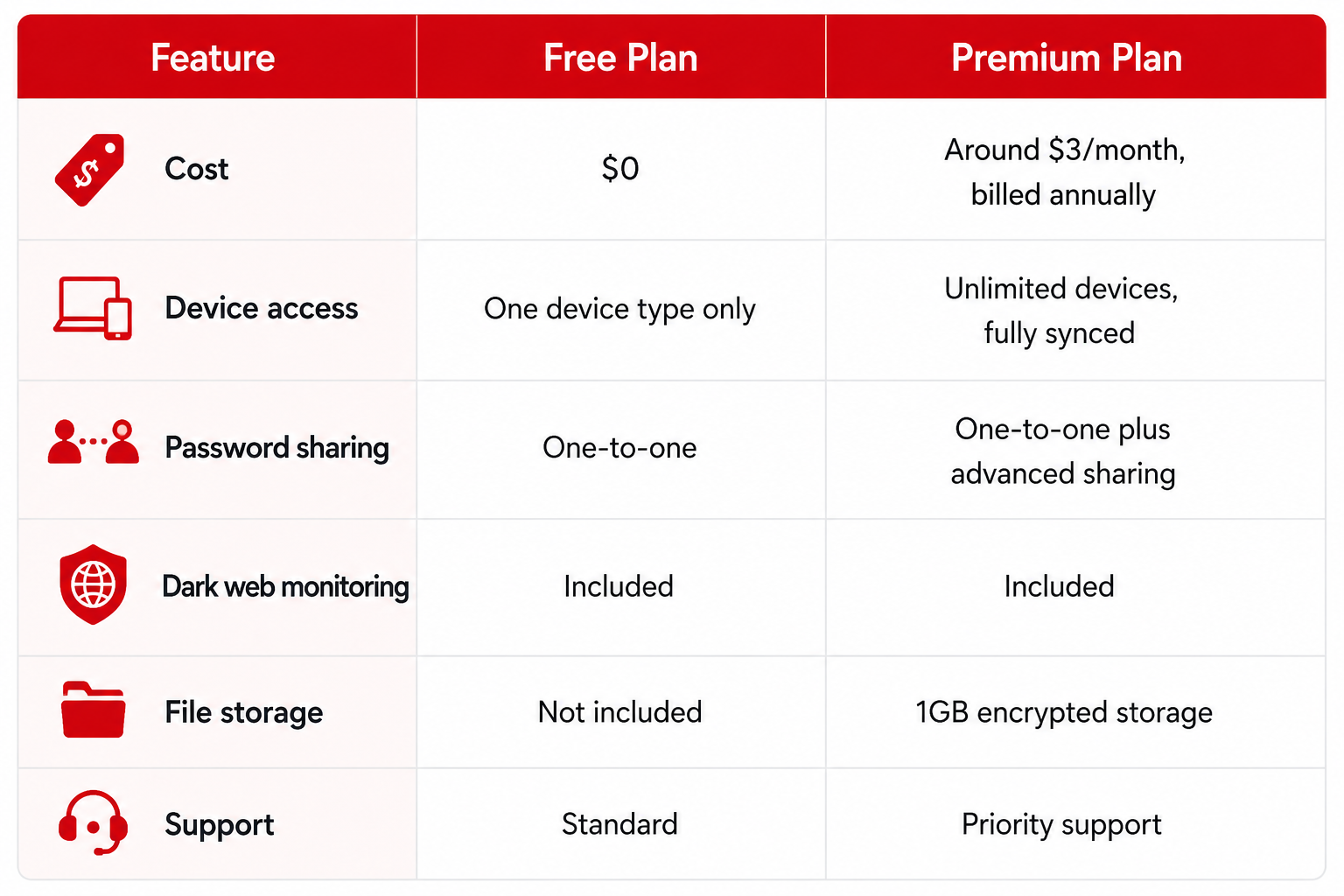
For the LastPass free vs premium question, the general rule holds up: casual, one-device users can happily stay free. Multi-device households, or anyone bouncing between a laptop and a phone constantly, should probably grab Premium. It's a small monthly cost, and switching over later takes seconds – no lost passwords, no drama.
LastPass Pricing, Broken Down Simply
LastPass pricing stays refreshingly approachable next to a lot of the competition, and there's genuinely a plan for almost every situation out there: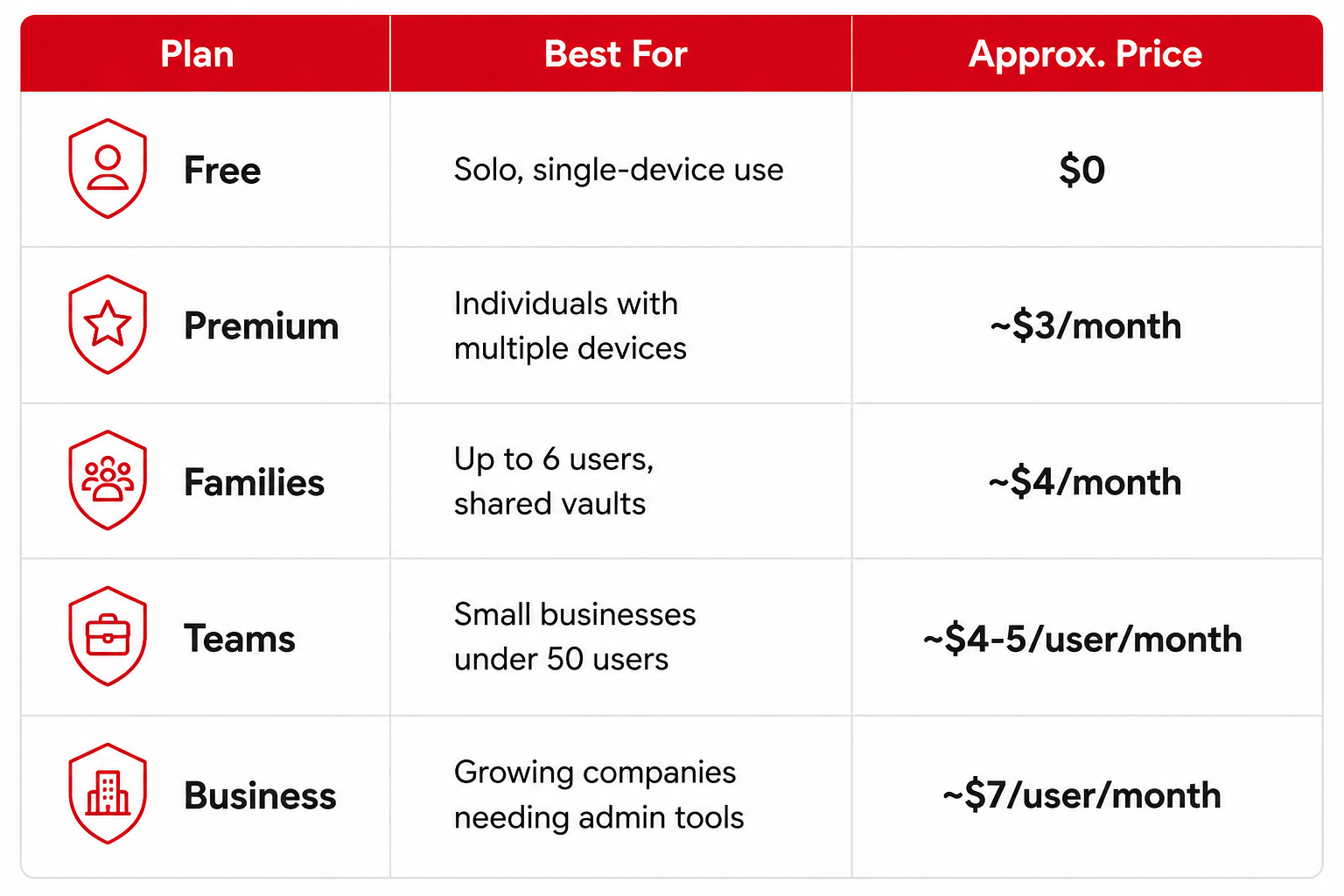
Annual billing keeps that monthly number low across the paid tiers. When you factor in the bundled encryption, sharing tools, and monitoring, LastPass pricing feels like a genuinely fair trade. Families especially get a lot out of it; up to six Premium accounts under one plan can work out to a relatively small monthly cost per person.
Is LastPass Still Safe to Use in 2026?
This is the big one, isn't it? The question everyone's actually asking. Is LastPass still safe to trust with all those passwords? Yes, and here's why. Since past challenges, LastPass has poured real resources into strengthening encryption, tightening zero-knowledge architecture, and being far more upfront about security practices. The vault uses AES-256 encryption and a zero-knowledge architecture, meaning LastPass cannot decrypt or access the plaintext passwords stored in your vault. Add MFA support and dark web monitoring into the mix, and it's clear real, visible work went into strengthening security here.Extra Layers That Keep Things Locked Down
Beyond the encryption talk, is LastPass still safe to use also comes down to daily habits, honestly. LastPass now pushes biometric login, hardware key support, and regular security checkups right through the dashboard. These layers stack together so one weak spot doesn't sink the whole vault. Turning on MFA adds an important extra layer of account protection, especially given how little effort it takes. For most everyday users, following those built-in prompts is a good place to start. No extra software, no complicated setup, just a few taps.Tips to Get More Out of It
A handful of small habits make a real difference here. Please enable multi-factor authentication as soon as possible; it only takes thirty seconds and significantly enhances your security. Run the built-in security checkup once a month. Maybe set a reminder, since it catches weak or reused passwords before they turn into an actual problem. Use the password generator every single time a new account is created; resist the urge to reuse an old favourite. And get the mobile app synced early so logins are just there, waiting, on every device from day one.Is LastPass Worth It in 2026?
So, is LastPass worth it? For the price, honestly, yes. It bundles password generation, secure sharing, breach monitoring, and cross-platform sync into one tidy little package. Free users get a genuinely useful starting point with no expiration, while Premium unlocks the convenience most people end up wanting once they get comfortable. Businesses get centralized control over employee credentials, saving real time for IT teams who'd otherwise be resetting passwords all day. Weigh the feature set against that modest monthly cost, and LastPass keeps delivering strong value across the board.Best LastPass Alternative? Why LastPass Still Comes Out Ahead
People naturally look around before committing, and that's smart. It's always worth comparing. When weighing any best LastPass alternative, pricing, device support, and ease of use are the things that actually matter. LastPass tends to come out ahead on flexibility, thanks to wide device compatibility, a genuinely useful free tier, and family or business plans that don't require a finance degree to understand. Few competitors match that same balance of affordable pricing and real feature depth, which explains why LastPass keeps landing near the top of so many comparison lists, year after year.Best Password Manager 2026: Where Does LastPass Land?
In the running for best password manager 2026, LastPass remains a competitive option, thanks to a long track record, broad platform support, and ongoing updates. The mix of a functional free tier, an affordable Premium step-up, and business plans that actually scale gives it an edge for anyone wanting one tool that grows alongside them. Not many password managers pull off that balance of flexibility and ease of use quite so well, and that's exactly why it keeps earning the recommendation.Final Thoughts: Do the LastPass Reviews Actually Hold Up?
Pulling it all together then. The latest LastPass reviews paint a picture of a password manager that's matured, adapted, and stayed focused on what people actually need. Simplicity, strong encryption, and pricing that doesn't punish anyone for wanting to stay organized. Whether the plan is free or Premium, LastPass offers a genuinely solid way to keep credentials safe and synced across every device someone owns.For anyone still on the fence about downloading it, the answer leans firmly positive, and that's not just marketing talk. Between the encrypted vault, the smart autofill, the dark web monitoring, and plans flexible enough to cover a solo user or a whole growing team, LastPass checks nearly every box people look for in a modern password manager these days. It's approachable enough for a total beginner, yet capable enough for households and businesses juggling dozens of shared logins without breaking a sweat. LastPass remains one of the more budget-friendly choices out there for managing passwords in 2026, and honestly, it's not hard to see why it continues to attract users.
Start Using LastPass
Explore Newsbuck for more exclusive deals and important updates. We are your go-to source for all the news and trending stories across fashion, politics, health, entertainment and much more!
Read More Blogs:
Heat Or Compression? The Real Difference Between These Two Hand Pain Fixes
AI App Builder Vs Coding: Build Apps With Natural Language
Gaming Laptop Or Desktop? How To Actually Decide
FAQ
Q1. Multiple browsers okay?Ans: Yep, Chrome, Firefox, Edge, and Safari are all covered.
Q2. Does the free plan ever expire?
Ans: Nope, stays free indefinitely, just that one-device catch.
Q3. Hard to switch from another manager?
Ans: Not really; most logins import in minutes.
Q4. Biometric login supported?
Ans: Yes, fingerprint and face unlock both work on supported devices.